Do not use line breaks in ToolTip
Properties
AC0016
Info
Design
Code Fix
Ignore Obsolete
Developers sometimes add a \ escape sequence to split a ToolTip across two lines. Business Central does not render formatting in ToolTips — the backslash appears literally in the client:
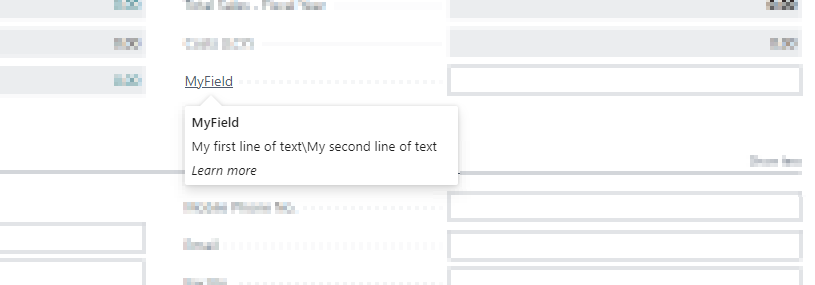
The backslash renders as literal text instead of a line break.
Do not use line breaks in the tooltip text. The tooltip cannot render formatting or line breaks.
— Guidelines for tooltip text on Microsoft Learn
Remove the escape sequence and keep the text as a single continuous sentence.
Example
page 50100 "My Page"
{
    layout
    {
        area(Content)
        {
            field(MyField; Rec.MyField)
            {
                ToolTip = 'My first line of text\My second line of text'; // Do not use line breaks in ToolTip [AC0016]
            }
        }
    }
}
Remove the line break and combine the text into a single sentence:
page 50100 "My Page"
{
    layout
    {
        area(Content)
        {
            field(MyField; Rec.MyField)
            {
                ToolTip = 'My first line of text. My second line of text.';
            }
        }
    }
}