Use identifier syntax in event subscriber arguments
Event subscribers declare their target through parameters in the [EventSubscriber] attribute. Before Business Central 2023 wave 1 (BC22), these parameters required string literals — single-quoted names that the AL Language extension cannot resolve. With string literals, Go To Definition (F12) does not work on the event name, reference counts are missing, and hovering shows no tooltip. The subscriber is effectively invisible to VS Code’s navigation.
Since BC22, the same parameters accept identifier syntax. Removing the single quotes (or replacing them with double quotes for names that contain spaces) enables full VS Code navigation: Go To Definition, Go To References, tooltips, and CodeLens reference counts.
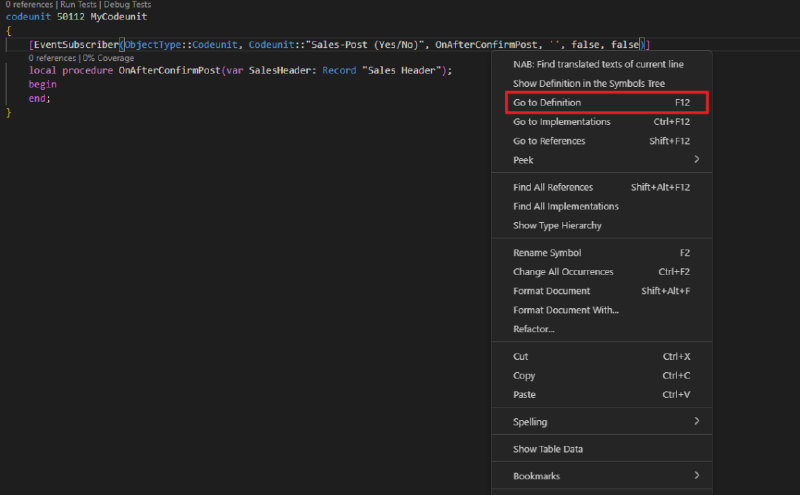
Identifier syntax enables Go To Definition, Go To References, tooltips, and CodeLens.
Example
codeunit 50100 MyCodeunit
{
    [EventSubscriber(ObjectType::Codeunit, Codeunit::"Sales-Post", 'OnAfterPostSalesDoc', '', false, false)] // Use identifier syntax in event subscriber arguments [LC0028]
    local procedure OnAfterPost(var SalesHeader: Record "Sales Header")
    begin
    end;
}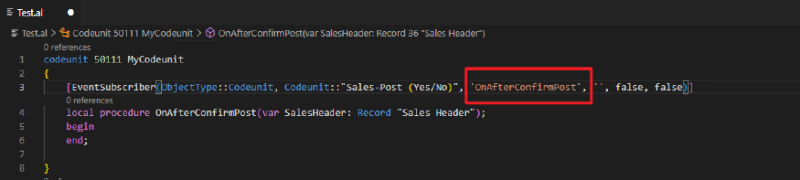
String syntax: the event name in single quotes has no navigability.
Replace the single-quoted string literal with an identifier — remove the quotes for simple names, or use double quotes for names that contain spaces:
codeunit 50100 MyCodeunit
{
    [EventSubscriber(ObjectType::Codeunit, Codeunit::"Sales-Post", OnAfterPostSalesDoc, '', false, false)]
    local procedure OnAfterPost(var SalesHeader: Record "Sales Header")
    begin
    end;
}
Identifier syntax: full VS Code navigation on the event name.
The AL Language extension provides a built-in code action to convert event subscriber parameters from string literals to identifiers. This can be applied to a single instance, the active file, the active project, or the entire workspace.
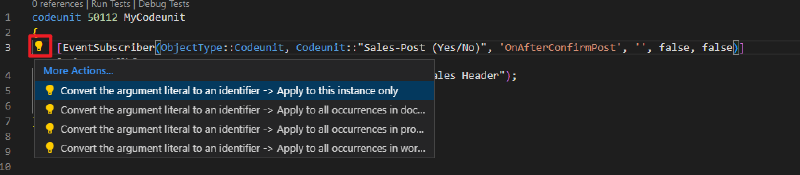
AL Language extension code action for converting string literals to identifiers.
See also
- Code navigability on event subscribers on Microsoft Learn
- Subscribing to Events on Microsoft Learn
- Business Central 2023 wave 1 (BC22) new features: Event navigability by ZHU on Dynamics 365 Lab
Images on this page are courtesy of ZHU from Dynamics 365 Lab.